How to change the default MS word color scheme

Last updated on December 23rd,>>>

change ms word color scheme

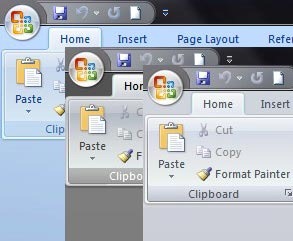
How to change change ms word color scheme of Microsoft word application. If you are bored with the default Blue color scheme of Microsoft word (MS office applications), there are two other different color schemes( silver and black) hidden inside the word menu itself which you can choose to spice up your MS office applications

So how do you do that in Office 2007, the procedure is almost same in office 2010 also (more on that at the end of this post)

Step 1:  Open word 2007 and than click on the big orb on the extreme left corner of the menu bar and from the menu click on the “Word Options” button as shown below.

Read more

How To Enable Hibernate Option In Windows 10, 8, 7

Last updated on September 20th,>>>When you open the Start menu in Windows 10 and select the power button, there is no Hibernate mode option. In this article we will show you 2 methods on how to enable hibernate option in Windows 10, 8, 7. Hibernation is a state, when your computer hibernates, it takes a … Read more

How to Remove Autorun.inf virus manually with winrar

how to remove autorun.inf virus

Last updated on April 16th,>>>Infection with autorun.inf virus is very common as it spreads through USB drives like the pen drive, memory cards etc. Autorun.inf is basically a simple text file that contains a list of instructions to be followed by the operating system. When you insert a CD or DVD or a USB drive, … Read more

How to access Desktop Icons without minimizing open files

Last updated on February 12th,>>>How to access Desktop Icons without minimizing open files, in your active windows? We all tend to keep our favorite programs and frequently used folders shortcut on the desktop for easy access. But how do you access one of your shortcuts in desktop, if there are multiple windows open, normally we … Read more